A spray chart is one of those visualizations that looks like it should require a graphics team and turns out to need about thirty lines of code. It is simply a top-down map of every ball a hitter put in play — one dot per batted ball, placed where the ball landed — and it tells you instantly things a stat line hides: whether a hitter yanks everything to the pull side, sprays line drives to all fields, or lives in the air to one gap. Statcast records the landing spot of essentially every batted ball, which means the raw material is free and public. The only trick is turning two cryptic coordinate columns into a recognizable baseball field.
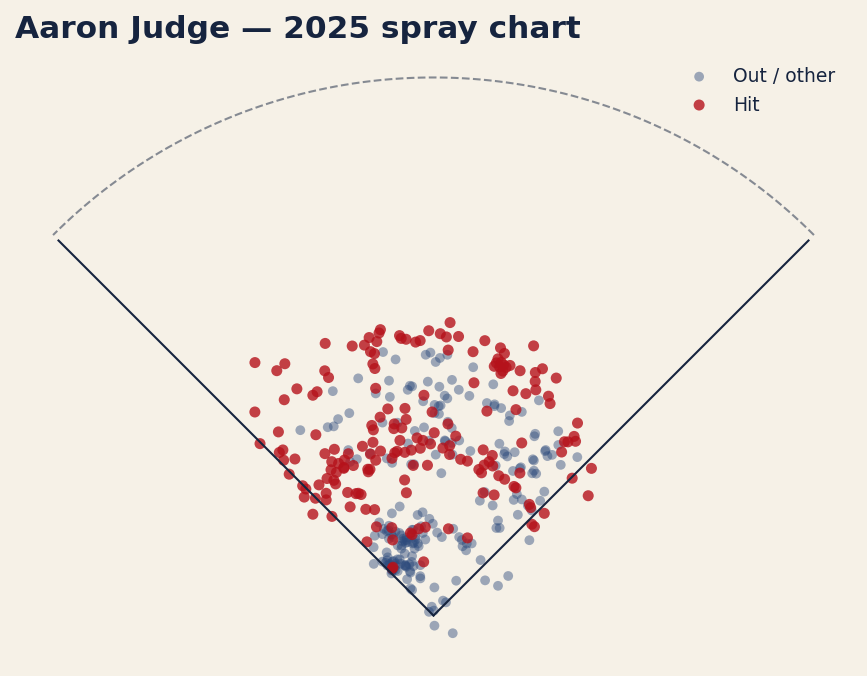
Here we do exactly that with Aaron Judge’s 2025 batted balls. Grab them from Statcast, scrub the bad rows, apply the one coordinate transform that makes everything snap into place, split hits from outs by color, and sketch the field around them. What comes out is 388 batted balls, 179 of them hits, scattered across a chart with foul lines and an outfield wall — the figure waits further down.
The setup
This tutorial assumes you already have pybaseball installed; if not, the companion piece on getting started with pybaseball covers installation and the basics in ten minutes. Beyond pybaseball we lean on numpy (for the outfield curve) and matplotlib. The imports:
import warnings; warnings.filterwarnings("ignore")
import matplotlib.pyplot as plt
import numpy as np
import pybaseball as pyb
We also need to identify our hitter and a date range. Statcast keys players by their MLB Advanced Media ID; Judge’s is 592450. We bracket the 2025 regular season with start and end dates — and the end date matters more than it looks:
PLAYER_ID = 592450          # Aaron Judge
START, END = "2025-03-27", "2025-09-28"   # regular season only
SCALE = 2.5                 # hit-coordinate units -> feet
The 2025 regular season finished on September 28. Push END into October and statcast_batter happily hands back the Wild Card games too, silently inflating every count you compute afterwards — the same trap the pybaseball quickstart warns about. Ending the window on the last day of the schedule is what keeps these totals comparable with a regular-season leaderboard. The SCALE constant is explained further down, once we have seen what the coordinates actually are.
Pull the batted balls
One function does the fetching. statcast_batter takes a start date, an end date, and a player ID, and returns a DataFrame with one row per pitch the batter saw — every pitch, not just balls in play — carrying dozens of Statcast columns including exit velocity, launch angle, the pitch type, the result, and the two we care most about here.
df = pyb.statcast_batter(START, END, PLAYER_ID)That single call can take a few seconds; it is pulling a whole season of pitch-level tracking data. Because this is a Statcast endpoint rather than a FanGraphs one, it is reliable for automated use and will not rate-limit you the way scraped leaderboards do.
What hc_x and hc_y actually are
The two columns that make a spray chart possible are hc_x and hc_y — the Statcast “hit coordinate” fields. They record where a batted ball was fielded or landed, expressed in the pixel coordinate system of the original broadcast/tracking video feed. Two consequences follow from that origin. First, only rows that have a batted ball carry these values; called strikes, balls, and swinging strikes leave them blank. Second, the numbers live in an awkward frame: the origin sits in the top-left corner of the image, and — this is the part that surprises everyone — hc_y increases downward, the opposite of a normal math plot.
So before we can plot anything we clean and transform. Do it in two steps, and keep them separate — the gap between them is a number worth knowing:
bip = df[df["type"] == "X"].copy()                # every batted-ball event
bb  = bip.dropna(subset=["hc_x", "hc_y"]).copy()  # the ones we can plot
The type column collapses each pitch to one of three letters — S for a strike, B for a ball, X for a ball put in play — so type == "X" is the canonical batted-ball filter, and it is what a leaderboard means by “batted-ball events.” For Judge’s 2025 that leaves 388 rows, which is exactly the BBE total on the Savant leaderboard used in the barrel-rate piece. Of those 388, 179 were hits.
The second line then drops rows with no landing coordinate. Tracking is not perfect: one Judge home run in 2025 came back with blank hc_x/hc_y, so 387 of the 388 make it onto the chart. Doing the filter in this order is what lets you say both numbers out loud instead of quietly reporting the smaller one as if it were the season total. The events column — single, field_out, home_run, and so on — is what we colour by two sections from here.
The coordinate transform
Here is the line that does the magic, and it is worth understanding rather than copying blindly:
bb["x"] = (bb["hc_x"] - 125.42) * SCALE
bb["y"] = (198.27 - bb["hc_y"]) * SCALE
Those two constants are the standard, widely used Statcast spray-chart transform. The value 125.42 is the pixel x-coordinate of home plate, so subtracting it recenters the horizontal axis on home plate: a ball pulled to the left-field line gets a negative x, one pushed to right field gets a positive x, and a ball straight up the middle sits near zero. The 198.27 - hc_y half does two jobs at once. The 198.27 is home plate’s pixel y-coordinate, and subtracting hc_y from it both recenters the vertical axis and flips its direction — canceling that upside-down image convention — so that deeper fly balls now get a larger, positive y. The net effect: home plate lands at the origin and the field opens upward, exactly the way you would draw it on paper.
Then there is SCALE, and skipping it is the single most common way this chart goes wrong. After the shift, the coordinates are still in broadcast-frame units, and one unit is roughly 2.5 feet. You can check that against the data rather than taking it on faith: for Judge’s 2025 home runs, dividing Statcast’s own hit_distance_sc (which is in feet) by the untransformed radius sqrt(x² + y²) gives a ratio clustered tightly around 2.48, which is where the conventional 2.5 comes from. Multiply by it and the dots are in feet. Leave it out and the dots stay two and a half times too small — while the foul lines and outfield wall we are about to draw are in feet, which strands the whole batted-ball cloud in the infield and leaves the wall floating out past every point on the chart.
Classify hits versus outs
A spray chart is far more readable when hits and outs are different colors, and the events column already holds everything we need to split them. We define the set of events that count as hits and test membership:
hits = {"single", "double", "triple", "home_run"}
bb["is_hit"] = bb["events"].isin(hits)
That creates a boolean column, True for the four hit types and False for everything else — field outs, force outs, fielder’s choices, errors, and the rest. It is a deliberately strict definition: a reached-on-error ball is not scored a hit, and we leave it that way. Before plotting, a quick guard rail confirms the pull actually returned data — if fewer than fifty batted balls came back, something went wrong with the date range or ID, and we would rather raise an error than chart noise:
if len(bb) < 50:
    raise ValueError("too few batted balls: %d" % len(bb))
Draw the field
Now the plot. We split the cleaned frame into outs and hits, scatter each in its own color, then sketch the two foul lines and a rough outfield arc so the dots read as a baseball field rather than a random cloud of points.
fig, ax = plt.subplots(figsize=(7.2, 7.0))
outs = bb[~bb["is_hit"]]
hit  = bb[bb["is_hit"]]

ax.scatter(outs["x"], outs["y"], s=22, alpha=.45,
           edgecolor="none", label="Out / other")
ax.scatter(hit["x"], hit["y"], s=28, alpha=.8,
           edgecolor="none", label="Hit")

# foul lines + a stylized wall: 330 down the lines, 400 to center
ax.plot([0, -233], [0, 233], color="black", lw=1)
ax.plot([0,  233], [0, 233], color="black", lw=1)
th = np.linspace(np.pi/4, 3*np.pi/4, 200)
wall = 330 + 70*np.sin(2*(th - np.pi/4))
ax.plot(wall*np.cos(th), wall*np.sin(th),
        color="black", lw=1, ls="--", alpha=.5)

ax.set_aspect("equal")
ax.axis("off")
ax.set_title("Aaron Judge — 2025 spray chart", loc="left")
ax.legend(loc="upper right", frameon=False, fontsize=9)
plt.show()
A few details earn their keep. The two ax.plot lines draw foul lines from home plate at the origin out to the corners at a 45-degree angle — one to (-233, 233) for the left-field line, one to (233, 233) for right, which is 330 feet measured along the line. The numpy block sweeps an angle from 45 to 135 degrees and traces a dashed wall that runs 330 feet down each line and bulges to 400 in center, roughly the shape of a generic park; a constant-radius arc is easier to write, but no real outfield is a circle. set_aspect("equal") is not optional: without it, matplotlib would stretch one axis and turn your symmetric field into a lopsided oval. And axis("off") hides the axis numbers, which mean nothing to a reader anyway. The result:
Reading it, and making it yours
The chart earns its keep at a glance. Judge’s 388 batted balls — 387 of them carrying coordinates to plot — fan across all fields, with the red hit-dots clustering where you would expect a great hitter’s damage to live; 179 of those batted balls fell for hits. You can see pull tendency, opposite-field ability, and the depth of his fly balls in a single image, none of which a slash line conveys.
Two things about the sketched field are worth reading correctly rather than treating as bugs. Dots beyond the dashed wall are mostly home runs, which are recorded where they land — in the seats, past the fence. And a couple of dozen dots sit outside the foul lines: foul pop-ups caught in foul territory are batted-ball events too, and because 125.42 and 198.27 approximate a broadcast frame rather than surveyed coordinates, a ball struck within a few degrees of the line can plot on the wrong side of a perfectly 45-degree sketch. A spray chart is a good map, not a survey.
To run this for any hitter, change exactly one thing: the player ID. If you do not have it memorized, look it up by name — pyb.playerid_lookup("betts", "mookie") returns a small table whose key_mlbam column is the ID you drop into PLAYER_ID. Swap that number, adjust the season dates if you like, and rerun. Everything downstream — the transform, the hit/out split, the field — is hitter-agnostic and works unchanged.
The bottom line
A spray chart feels like advanced analytics and is really just careful data hygiene plus one coordinate transform. The hard parts — knowing that hc_x/hc_y exist, that hc_y runs upside down, and that subtracting 125.42 and flipping around 198.27 centers home plate — are now behind you. Pull the batted balls, drop the blanks, transform the coordinates, color the hits, draw the lines. From there, every hitter in baseball is one ID number away from a chart of his own.
Sources & Further Reading
- Batted-ball data: Baseball Savant (Statcast), pulled via pybaseball’s
statcast_batter. Aaron Judge’s 2025 regular-season coordinates retrieved September 2026; computed for this article from that source. - MLB.com — background on Statcast tracking and the hit-coordinate fields.
- Baseball-Reference — season context and the companion
batting_stats_brefpull used in the pybaseball quickstart.